HP DeskJet 4255e Review: The Ideal All-in-One Printer for Home Use
Key Takeaways
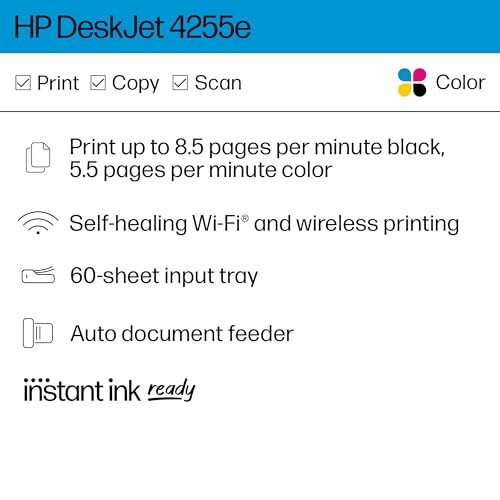
- Compact design fits seamlessly into any home environment.
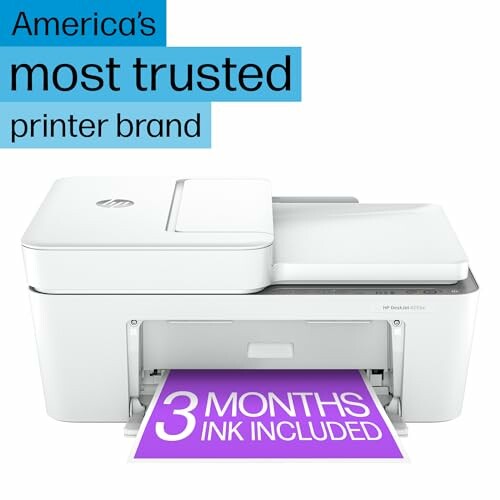
- Includes 3 months of ink with HP+ subscription service.
- Wireless printing capabilities for easy mobile access.
- Energy-efficient design certified by ENERGY STAR and EPEAT.
- 4.0 out of 5 stars based on 25,791 ratings.
The HP DeskJet 4255e is not just another printer; it’s an all-in-one solution designed to meet the diverse needs of your home office. With its sleek and compact design, this multifunctional printer is perfect for printing to-do lists, recipes, and important documents, all while providing seamless wireless capabilities.
Equipped with features like an auto document feeder and a user-friendly app, the DeskJet 4255e makes printing, scanning, and copying easier than ever. Discover how this device stands out in our comprehensive review!
About HP DeskJet 4255e
The HP DeskJet 4255e Wireless All-in-One Color Inkjet Printer is designed to cater to the everyday printing, scanning, and copying needs of any home office. With its impressive set of features, this printer ensures you have everything at your fingertips to manage your tasks effectively.
Key Features
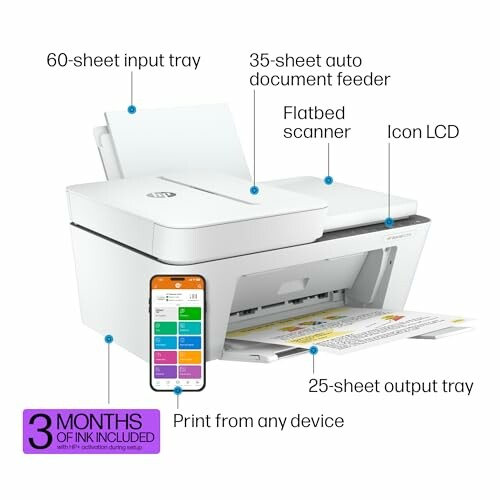
- Compact Design: The printer's sleek and minimalistic design allows it to fit seamlessly into any workspace without taking up too much room.
- All-in-One Functionality: It combines printing, scanning, and copying capabilities in one device, making it a versatile choice for various tasks.
- High-Quality Output: With a maximum print speed of 5.5 pages per minute for color and 8.5 pages per minute for black and white, it provides efficient performance.
- Wireless Connectivity: Featuring single band Wi-Fi, the DeskJet 4255e ensures a stable connection and allows for easy printing from mobile devices using the HP Smart app.
- Energy Efficient: The printer is ENERGY STAR and EPEAT certified, promoting energy savings without compromising performance.
Performance Metrics
| Feature | Specification |
|---|---|
| Maximum Print Speed (Color) | 5.5 ppm |
| Maximum Print Speed (Monochrome) | 8.5 ppm |
| Weight | 10.6 lbs |
| Input Tray Capacity | 60 sheets |
| Monthly Duty Cycle | Up to 1000 pages |
Ease of Use
- User Interface: The intuitive control panel with an icon LCD makes it easy to navigate through various functions.
- Setup and Installation: The setup process is straightforward, allowing users to get started quickly with clear instructions provided in the user manual.
- Customer Support: HP offers robust customer support services, ensuring that users can resolve any issues or inquiries efficiently.
Ideal Use Cases
The HP DeskJet 4255e is ideal for:
- Home users who need an efficient printer for everyday documents and school projects.
- Small office environments where space is limited, but multifunctional capabilities are essential.
- Families looking for a reliable printer that can handle various tasks, from printing recipes to creating colorful presentations.
This printer is not only designed for efficiency but also emphasizes sustainability, being made with at least 60% post-consumer recycled plastic. Its HP Instant Ink eligibility further enhances convenience, providing ink delivery directly to your door.
 Check Current Price
Advantages and Disadvantages of the HP DeskJet 4255e
Pros
- Compact design that fits well in any workspace.
- Easy wireless connectivity through single band Wi-Fi.
- Versatile all-in-one functionality for printing, scanning, and copying.
- Comes with 3 months of ink included with the HP+ subscription.
- Energy-efficient, certified by ENERGY STAR and EPEAT.
Cons
- Ink may run out quickly with frequent use.
- Some users reported paper jams during operation.
- Setup requires the use of the HP+ app for full functionality.
Overall, the HP DeskJet 4255e offers a range of benefits that make it a strong contender for home and small office use. Its compact design, multifunctional features, and energy efficiency outweigh the minor drawbacks, making it a worthwhile investment for users seeking reliable printing solutions.
Final Thoughts on the HP DeskJet 4255e: A Smart Choice for Your Home Office
Tips for Buyers
- Consider Your Needs: Think about how frequently you will use the printer and what types of documents you will print.
- Check for Wireless Compatibility: Ensure your devices are compatible with the printer for seamless wireless printing.
- Look for Subscription Plans: Evaluate if the HP Instant Ink service is suitable for your usage to avoid running out of ink unexpectedly.
- Avoid Overlooking Size: Make sure to measure your available space to ensure the printer fits comfortably in your home office.
In summary, the HP DeskJet 4255e shines with its compact design and multifunctional capabilities, making it an excellent investment for home users and small offices. It offers a solid blend of features, including wireless connectivity and energy efficiency, while delivering high-quality prints.
However, potential buyers should be aware of the printer's ink consumption and the occasional paper jam reported by some users. Despite these minor drawbacks, the benefits significantly outweigh them.
For anyone looking for a reliable and efficient all-in-one printer that can handle everyday tasks while being mindful of energy usage and sustainability, the HP DeskJet 4255e is highly recommended. With its user-friendly features and the added bonus of three months of ink with HP+, this printer is poised to meet your home office needs effectively.
 Check Current Price
Your Questions About the HP DeskJet 4255e Answered
-
Q: Is the printer only Wi-Fi compatible?
A: Yes, this model operates on Wi-Fi only and does not support HDMI connections.
-
Q: How is the setup process?
A: The setup is straightforward, typically requiring the use of the HP+ app on your device.
-
Q: Does it come with ink?
A: Yes, it includes 3 months of ink through the HP+ subscription service.
-
Q: What kind of paper jams can occur?
A: Some users have reported that paper may get stuck occasionally during printing.
-
Q: Is the printer suitable for high-volume printing?
A: It is best for occasional printing, as ink may run out quickly with frequent use.