
Ultimate Guide to the Tonmom Adjustable Laptop Stand
Key Takeaways
- Adjustable height settings for ergonomic comfort.
- Sturdy design with anti-slip features for device protection.
- Excellent heat dissipation to keep your laptop cool.
- Lightweight and portable, perfect for travel.
- Compatible with a wide range of laptops and tablets.
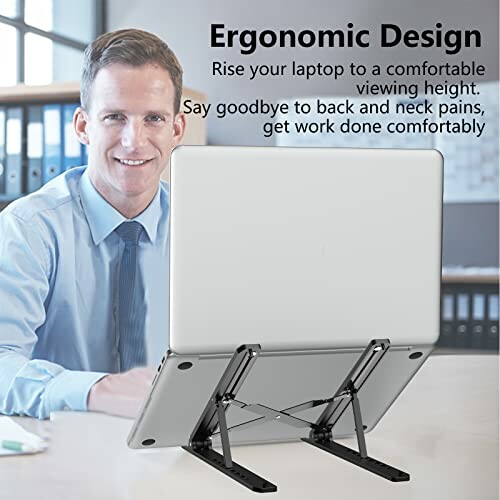
In today's fast-paced work environment, having the right tools is essential for productivity and comfort. The Laptop Stand for Desk is designed to elevate your laptop experience, offering adjustable height settings and a stable platform. Whether you're working from home, in the office, or on the go, this stand enhances your posture and reduces strain, making it a must-have accessory for anyone using a laptop.
With its lightweight design and broad compatibility, the adjustable laptop riser caters to various users, from students to professionals. Say goodbye to neck and back pain and hello to a more comfortable, efficient workspace!
About the Laptop Stand for Desk
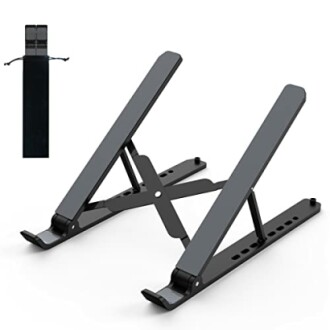
The Laptop Stand for Desk is a versatile solution for anyone looking to improve their workspace ergonomics. Made from high-quality ABS and silicone materials, this adjustable laptop riser is both durable and aesthetically pleasing. Its sleek black finish seamlessly fits into any environment, whether it's at home, in the office, or on a business trip.
Key Features
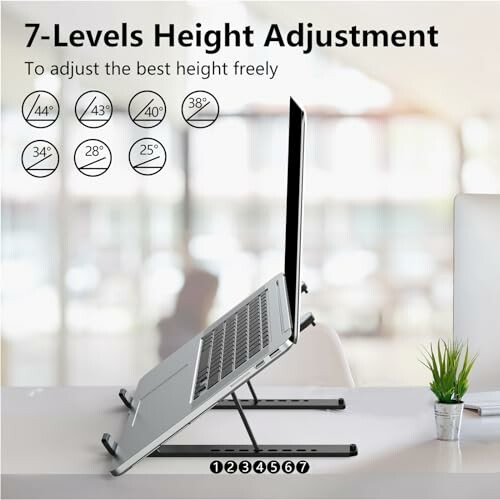
- Adjustable & Ergonomic: The stand elevates your laptop from 2.78” to 6.5” (7 levels), ensuring that your screen is at eye level. This helps to prevent neck fatigue and promotes better posture.
- Sturdy & Protective: The triangle support design provides excellent stability. With large anti-slip silicone pads, it keeps your device secure and protected from scratches.
- Heat Dissipation: The open design allows for optimal airflow, aiding in heat dissipation and keeping your laptop cool during operation.
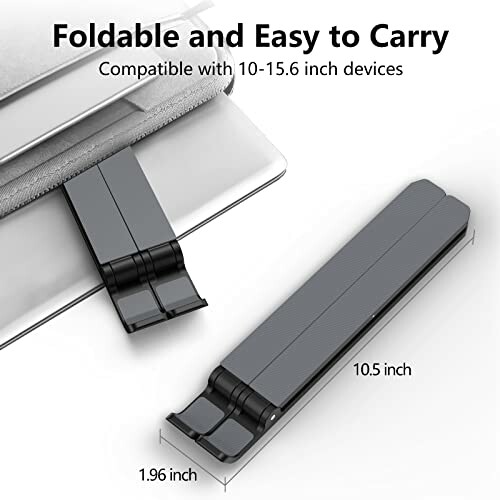
- Portable & Foldable: Weighing only 0.57 pounds, it quickly folds into a compact size of 10.5” x 1.96” x 0.92”, making it easy to carry in its durable sleeve bag.
- Broad Compatibility: This stand accommodates laptops ranging from 10-15.6 inches, including popular brands like Dell, HP, ASUS, and Microsoft Surface.
Design and Build Quality
The Laptop Stand features a robust construction that ensures longevity and stability. The combination of ABS and silicone not only adds to its durability but also enhances its aesthetic appeal. The smooth edges of the stand are designed to avoid any discomfort during use, making it suitable for prolonged sessions.
Performance and Use Cases
This laptop riser is perfect for various scenarios:
- Home Office: Elevate your laptop to eye level, reducing strain during long work hours.
- Travel: Its lightweight, foldable design makes it an ideal companion for business trips or remote working.
- Outdoor Use: Use it comfortably in parks or cafes without worrying about overheating.
Ease of Use
Setting up the Laptop Stand is a breeze. The adjustable height settings allow users to customize the stand to their preferred height without any tools. The user manual provides clear instructions, making it accessible even for beginners.
 Check Current Price
Why Choose the Laptop Stand: Pros and Cons
Pros
- Adjustable height settings for personalized comfort, promoting better posture.
- Sturdy construction with anti-slip features ensures your laptop stays secure.
- Lightweight and portable design makes it easy to carry for travel or remote work.
- Excellent heat dissipation design allows for optimal airflow, preventing overheating.
- Compatible with a wide range of laptops and tablets, enhancing versatility.
Cons
- Can feel slightly flimsy during setup, especially when adjusting height one-handed.
- May require a learning curve for those unfamiliar with adjustable stands.
- Some users reported needing more stability for heavier laptops.
In summary, the Laptop Stand for Desk offers a fantastic combination of adjustable comfort, portability, and stability, making it a top choice for anyone seeking to enhance their workspace. While it has minor drawbacks, the benefits far outweigh them, making it a worthy investment.
Wrap-Up: Elevate Your Workspace with Confidence
Tips for Buyers
When shopping for a laptop stand, consider the following:
- Adjustability: Look for models that offer multiple height settings for ergonomic comfort.
- Stability: Ensure the stand has sturdy construction and anti-slip features to keep your laptop secure.
- Portability: If you travel frequently, choose a lightweight and foldable design for easy transport.
- Heat Dissipation: An open design can help with airflow and keep your laptop cool during use.
- Compatibility: Check if the stand supports your laptop size and model.
In summary, the Laptop Stand for Desk stands out for its adjustable height and ergonomic design, providing a range of benefits such as reduced neck and back strain, enhanced airflow for cooling, and a sturdy yet portable form factor. While some users may find it slightly flimsy or challenging to adjust one-handed, the overall advantages make it a valuable addition to any workspace.
For anyone seeking an affordable and effective solution to improve their laptop experience, this stand comes highly recommended. Its versatility and compatibility with a variety of devices ensure that it meets the needs of professionals and casual users alike.
 Check Current Price
Your Questions Answered: Laptop Stand Insights
-
Q: Is this stand suitable for **heavier laptops**?
A: While it holds most laptops securely, some users mentioned it feels **less stable** with heavier models.
-
Q: How does the stand help with **heat dissipation**?
A: The **open design** promotes airflow, which helps keep your laptop cool during use.
-
Q: Can I use this stand for **tablets** as well?
A: Yes, it is compatible with various **tablet sizes**, making it versatile for different devices.
-
Q: How portable is this stand for **travel**?
A: Very portable; it **folds compactly** and fits easily in bags, ideal for on-the-go use.
-
Q: What are the **height adjustment** levels available?
A: The stand offers **seven height levels**, allowing users to find their preferred position easily.